



Enterprise email is the channel through which organisations deliver documents and detailed records to customers: statements, invoices, policy documents, booking confirmations, receipts and onboarding information. It carries content customers retain, refer back to and often require for compliance or reimbursement purposes.
Its reach is unmatched. The Radicati Group estimates that more than 4.5 billion people use email worldwide, a figure projected to keep growing through 2028. For enterprises operating at scale, email is infrastructure: authentication, sending architecture and sender reputation determine whether messages reach the inbox, and mailbox providers now enforce these requirements rather than recommend them.
This guide covers how email evolved, how enterprises integrate it through APIs, how spam filtering works today, and the practices that protect inbox placement, security and consent.
How Enterprise Email Evolved: From ARPANET to Authenticated Infrastructure
Email has lasted because it is an open standard, not a platform owned by one company.
| Year | Milestone | Why It Matters Today |
|---|---|---|
| 1971 | Ray Tomlinson sends the first networked email on ARPANET, introducing the @ sign | Established user@domain addressing |
| 1978 | The first unsolicited bulk email is sent to ARPANET users | The spam problem begins |
| 1982 | SMTP is defined in RFC 821 | Still the protocol that moves every email |
| 1992 | MIME is introduced | Enabled attachments and HTML, the basis of statements and invoices |
| 2002 to 2004 | Statistical (Bayesian) filters and large webmail providers mature | Filtering moves from fixed rules to learning systems |
| 2006 to 2015 | SPF, DKIM and DMARC are standardised | Senders can prove they are who they claim to be |
| 2024 to 2025 | Gmail, Yahoo and Microsoft enforce authentication for bulk senders | Authentication becomes a condition of delivery |
Why email remains a trusted enterprise channel:
-
It is addressable and portable. Every customer has an email address, independent of device, app or operator.
-
It is verifiable. Authentication lets mailbox providers and customers confirm that a message came from the sending organisation.
-
It is a record. Messages persist, can be searched and carry attachments, which suits statements, contracts and compliance documents.
-
It is interoperable. Any system can send email through SMTP or an API, which makes it the easiest channel to connect to enterprise software.
Enterprise Email Explained: Infrastructure, Not Just Campaigns
Enterprise email covers two broad categories of message:
-
Transactional email: Triggered by a customer action or account event, such as order confirmations, password resets, statements, invoices and policy documents.
-
Campaign email: Newsletters, product announcements and customer communication sent to defined audiences.
When transactional and campaign email share the same sending infrastructure, an issue affecting one stream affects the other. A campaign that generates complaints can influence the reputation of the domain that also sends password resets and statements. Enterprises should separate streams using distinct sending domains or subdomains, dedicated IP addresses where volumes justify them, and independent monitoring for each stream.
Enterprise Integration: Automating the Customer Journey With Email APIs
Email performs best when business events trigger it, rather than when teams schedule it manually. An Email API lets enterprise systems send messages programmatically and receive delivery data back in real time.
1. Event: A system records an action, such as a payment, policy issuance or abandoned order.
2. API request: The system sends the recipient, template and data fields to the email platform’s API.
3. Rendering and delivery: The platform assembles the message from a stored template and sends it through authenticated infrastructure.
4. Webhooks: Delivery, bounce, open, click, complaint and unsubscribe events return to the originating system.
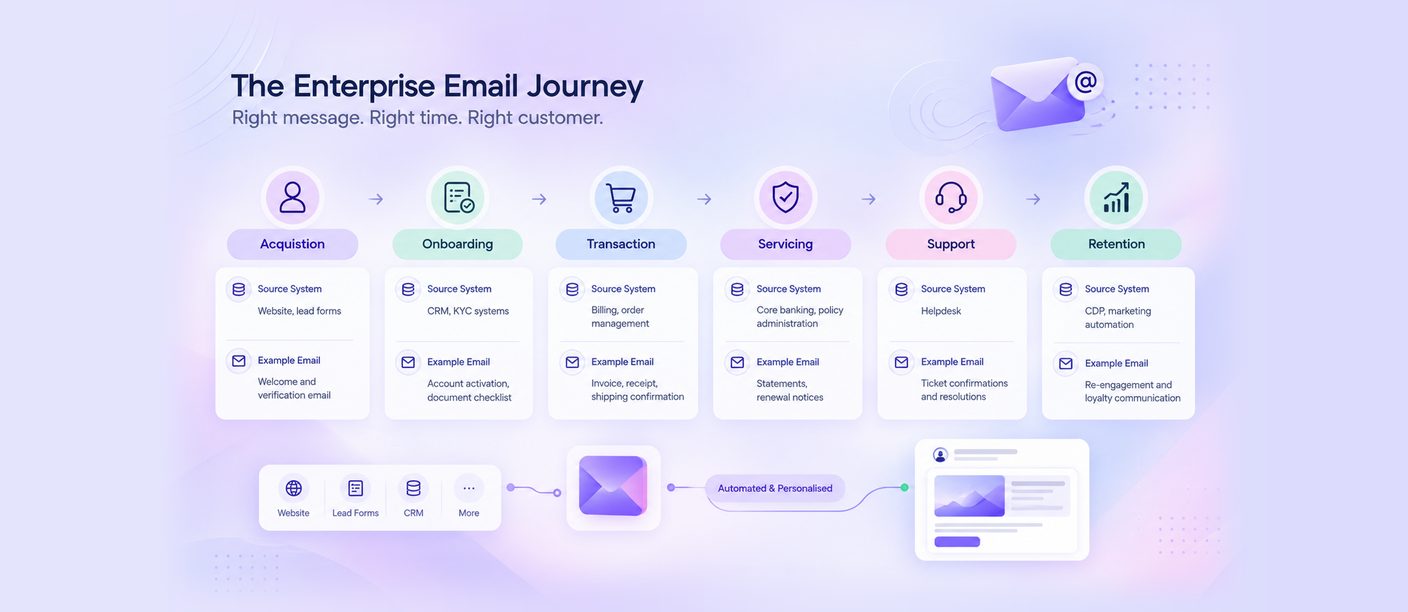
| Journey Stage | Source System | Example Email |
|---|---|---|
| Acquisition | Website, lead forms | Welcome and verification email |
| Onboarding | CRM, KYC systems | Account activation, document checklist |
| Transaction | Billing, order management | Invoice, receipt, shipping confirmation |
| Servicing | Core banking, policy administration | Statements, renewal notices |
| Support | Helpdesk | Ticket confirmations and resolutions |
| Retention | CDP, marketing automation | Re-engagement and loyalty communication |

Practical recommendations:
-
Keep templates in the email platform and data in your systems, so content teams can update design without engineering releases.
-
Use idempotency keys, so a retried API call does not send a customer a duplicate statement.
-
Write webhook events back to the CRM, so agents can see whether a customer received a document before resending it.
-
Apply suppression centrally, so an unsubscribe recorded by one system is honoured by all of them.
-
Separate API keys by stream and environment, with least-privilege access.
For example, an insurer can generate a policy document in its policy administration system, trigger an email with the PDF attached within seconds of payment, and log the delivery event against the customer record for audit.
Email Authentication: SPF, DKIM, DMARC and BIMI
Since February 2024, Google has applied stricter rules to anyone sending close to 5,000 or more messages a day to personal Gmail accounts. Yahoo introduced matching requirements, and Microsoft applied equivalent rules for Outlook in 2025. Senders that do not comply risk rejection or spam placement.
1. SPF (Sender Policy Framework): Specifies which servers are authorised to send email for a domain.
2. DKIM (DomainKeys Identified Mail): Adds a cryptographic signature confirming the message was not altered in transit.
3. DMARC (Domain-based Message Authentication, Reporting and Conformance): Instructs mailbox providers how to handle messages that fail authentication, and provides reporting on domain usage.
4. BIMI (Brand Indicators for Message Identification): Displays the brand’s logo in supporting inboxes once a suitable DMARC policy is in place.
Bulk senders must also pass SPF and DKIM, publish a DMARC record aligned with the From domain, and offer one-click unsubscribe on marketing email, honouring requests within two days.
Adoption is rising, but enforcement lags. EasyDMARC’s 2026 analysis of 1.8 million domains found DMARC adoption at 52.1%, up from 47.7% in 2025, while only around 9% of domains combine an enforcement policy with reporting. Fortune 500 companies lead, with 95% adoption and more than 80% at enforcement.
How Spam Filtering Evolved and What It Means for Marketing Email
Email filtering has moved through four generations:
1. Rules and blocklists (1990s): Keyword matching and lists of IP addresses known to send spam.
2. Content scoring (early 2000s): Statistical filters learned which words and patterns predicted spam.
3. Reputation (2010s): Filters shifted from judging content to judging the sender, first by IP address, then by domain.
4. Authentication and engagement (2020s): Machine learning weighs authentication results, complaints and how recipients interact with a sender’s email over time.
The practical consequence is that inbox placement is now earned through recipient behaviour. Content still matters, but a well-written email from a domain with high complaint rates will still reach the spam folder.
The complaint threshold is strict. Gmail withdraws delivery mitigation from a bulk sender while its user-reported spam rate is above 0.3%, and restores eligibility only after the rate stays below that level for seven consecutive days. Most deliverability teams treat 0.1% as the working ceiling.
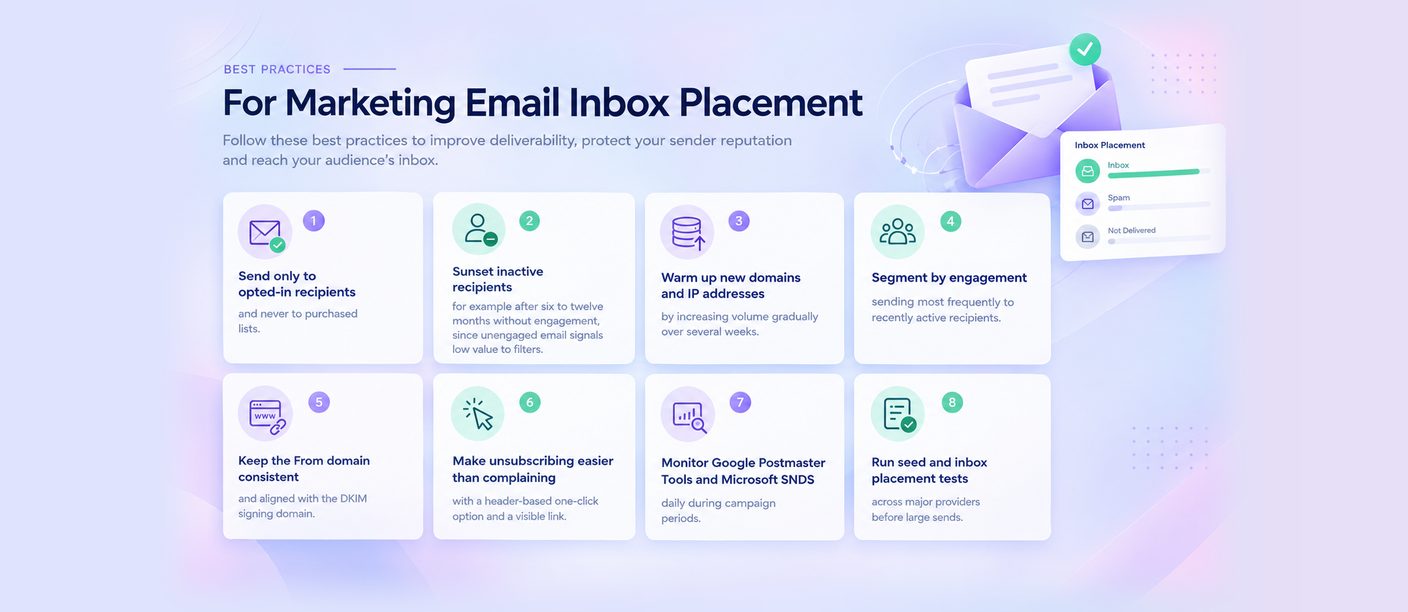
Best practices for marketing email inbox placement:
-
Send only to opted-in recipients, and never to purchased lists.
-
Sunset inactive recipients, for example after six to twelve months without engagement, since unengaged email signals low value to filters.
-
Warm up new domains and IP addresses by increasing volume gradually over several weeks.
-
Segment by engagement, sending most frequently to recently active recipients.
-
Keep the From domain consistent and aligned with the DKIM signing domain.
-
Make unsubscribing easier than complaining, with a header-based one-click option and a visible link.
-
Monitor Google Postmaster Tools and Microsoft SNDS daily during campaign periods.
-
Run seed and inbox placement tests across major providers before large sends.
Interactive Email With AMP
AMP for Email allows customers to complete an action within the message itself, such as submitting a survey or confirming an appointment, without opening a browser. A standard HTML version should always accompany an AMP version, because support varies across mailbox providers.
Template Design, Accessibility and Testing
Templates should use responsive layouts, a logical heading structure, readable type sizes, sufficient colour contrast, descriptive link text, alternative text for every image and a plain-text version. Before release, test rendering across major clients, link accuracy, personalisation fields and attachment handling.
Security: Domain Protection and Phishing Prevention
Email is a common vector for impersonation, and a domain without an enforcing DMARC policy can be spoofed. Enterprises should move DMARC progressively from monitoring to quarantine and reject, review aggregate reports for unauthorised senders, use secure transmission for message delivery, and restrict access to the sending platform with role-based controls and audit logging. A register of authorised sending services prevents new tools from falling outside SPF and DKIM records.
Consent, Unsubscribe and the DPDP Act
Under the DPDP Act, enterprises must collect personal data for specified purposes with valid consent, and allow customers to withdraw consent easily. The Consent Manager framework becomes operational on 13 November 2026, with full compliance required from 13 May 2027.
Email lists accumulated over several years may not meet these standards. Enterprises should audit consent records, separate transactional obligations from campaign permissions, maintain preference records and make unsubscribing immediate and reliable.
Enterprise Email Use Cases Across Industries
-
BFSI and Insurance: Account statements, policy documents, tax certificates and renewal notices.
-
Retail and E-commerce: Order confirmations, invoices, shipping updates and incomplete order reminders.
-
EdTech: Admission communication, fee receipts and progress updates.
-
Travel and Logistics: Booking confirmations, e-tickets, itinerary changes and delivery documentation.
-
Healthcare and Government: Report delivery, appointment documentation and citizen updates requiring a retained record.
Measuring Email Performance
1. Delivery rate: Messages accepted by receiving servers.
2. Inbox placement rate: Messages reaching the inbox rather than the spam folder.
3. Open and click rates: Engagement indicators, interpreted with awareness of privacy features in mail clients.
4. Bounce and complaint rates: Indicators of list quality and reputation.
5. Authentication pass rates: SPF, DKIM and DMARC results across streams.
6. Completion: Actions finished as a result of the message.
Data Quality, Suppression and Retention
Maintain a single source of truth for contact records, validate addresses at the point of capture, and apply global suppression lists for unsubscribes, complaints and hard bounces across every sending system. Define rules for soft bounces and inactive recipients, offer a preference centre so customers can reduce frequency rather than opting out entirely and align retention schedules with regulatory requirements and the DPDP Act.
Operational Runbook for High-Volume Sends
1. Pre-send verification: Audience definition, suppression lists, personalisation fields and links checked.
2. Authentication check: SPF, DKIM and DMARC alignment confirmed for the sending domain.
3. Seed testing: Delivery and rendering verified across major mailbox providers.
4. Staged release: Volume released in batches, with monitoring between batches.
5. Live monitoring: Bounce rates, complaint rates and delivery behaviour reviewed during the send.
6. Post-send review: Performance, deliverability signals and issues documented for the next cycle.
Choosing an Enterprise Email Provider: An Evaluation Checklist
-
Authentication support: SPF, DKIM, DMARC and BIMI setup and monitoring.
-
Stream separation: Multiple sending domains and traffic isolation.
-
Deliverability tooling: Warm-up, bounce handling and reputation monitoring.
-
API and webhooks: Documented APIs, event webhooks and idempotent sending.
-
Scalability: High-volume sending for transactional and campaign email.
-
Interactive email: AMP support with HTML fallback.
-
Security: Domain protection, access control and audit logging.
-
Omnichannel capability: Orchestration with SMS, WhatsApp, RCS and voice.
-
Compliance: Consent and unsubscribe management aligned with the DPDP Act.
Enterprise Email With Smartping
Smartping’s enterprise email solution supports transactional and campaign email at volume. Multiple sending domains, authentication support and deliverability monitoring protect sender reputation, while trigger-based automation and API integration keep communication timely and accurate.
Through SPARC, email operates alongside SMS, WhatsApp, RCS and voice, so each message reaches customers through the channel configured for it, within one connected customer journey.
Schedule a demo at smartping.ai to see how Smartping can support your enterprise email programme.
Frequently Asked Questions
1. Is DMARC mandatory for bulk email senders?
Major mailbox providers, including Gmail, Yahoo and Microsoft Outlook, require bulk senders to authenticate email using SPF, DKIM and DMARC. Senders that do not comply risk rejection or spam placement.
2. What spam complaint rate should enterprises aim for?
Below 0.1%. Gmail withdraws delivery mitigation from bulk senders whose user-reported spam rate is above 0.3%.
3. What is an Email API?
An interface that lets business systems send email programmatically and receive delivery events through webhooks, so customer activity triggers communication automatically.
4. Can transactional and campaign emails share one domain?
They can, but separation is recommended. Distinct domains or subdomains protect critical transactional email from reputation issues arising in campaign communication.
5. Does AMP email work in every inbox?
No. AMP is supported by some mailbox providers. Enterprises should always include a standard HTML version so every recipient receives a working message.
6. How can an organisation prevent its domain being used for phishing?
Publish SPF, DKIM and an enforcing DMARC policy, monitor DMARC reports for unauthorised sending, and restrict platform access with role-based controls and audit logging.