


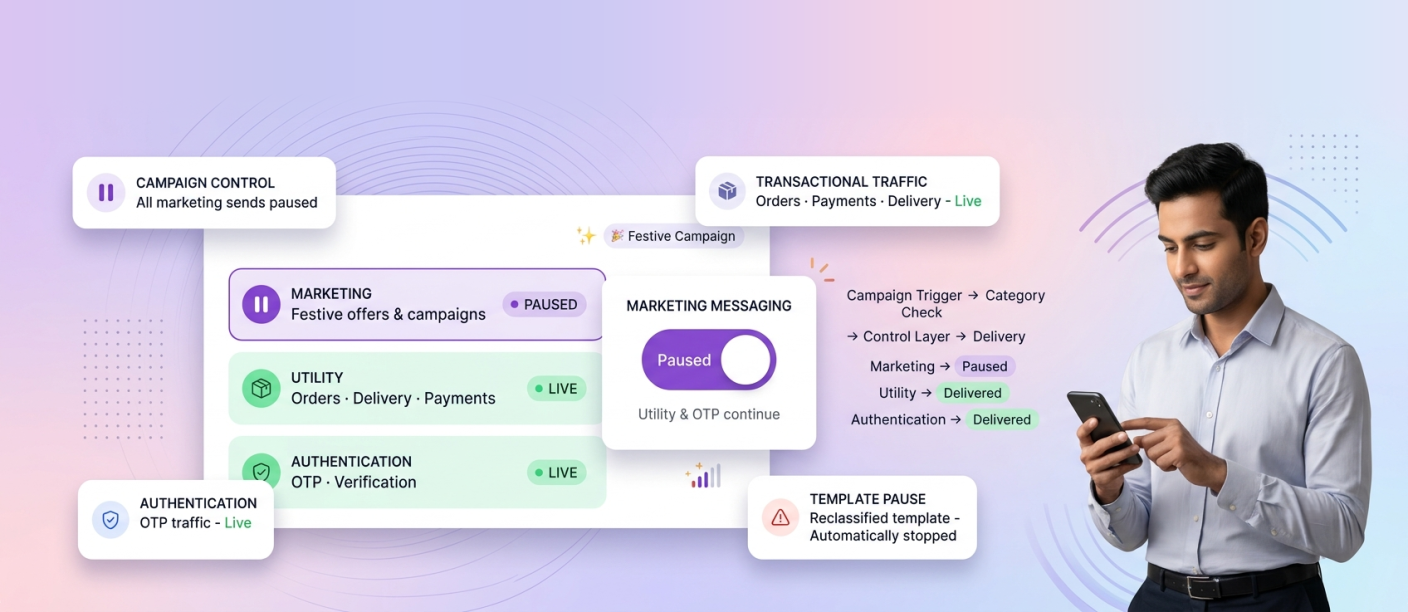
Enterprises can control WhatsApp marketing messages during festive campaigns by using a single, project-wide switch that pauses all marketing sends instantly while utility and authentication messages continue uninterrupted. This separation matters most when volumes peak: a campaign may need to stop because of an audit, an offer error or an integration change, but order confirmations, delivery updates and OTPs cannot stop with it.
Smartping’s Marketing Messaging Opt-in control, available as part of its WhatsApp Business Messaging solution, is built for exactly this. This guide explains why festive campaigns need dedicated send controls, how the feature works, and how marketing ops, compliance and IT teams can build it into their festive operating plan.
Why Festive Campaigns Need Dedicated Send Controls
Festive seasons compress months of marketing activity into a few weeks. Multiple teams schedule campaigns, agencies push creatives, and integrations trigger messages automatically from CRMs and commerce platforms. That scale creates specific risks:
Overlapping campaigns. Regional, category and brand teams may unknowingly target the same audience, leading to message fatigue and opt-outs.
Integration changes mid-season. When a CRM, CDP or commerce system is updated, automated triggers can fire unexpectedly.
Audit and compliance holds. Legal or compliance reviews sometimes require an immediate stop on promotional outreach while content is verified.
Customer quality signals. Excessive or irrelevant marketing messages can lead to blocks and reports, which affect the health of a business’s WhatsApp number.
Stopping campaigns one by one across teams is slow and error-prone. Shutting down WhatsApp messaging entirely is worse, since it also stops the transactional communication customers depend on during the busiest buying weeks of the year.
Understanding the Three WhatsApp Message Categories
Effective campaign control starts with the way the WhatsApp Business API classifies business-initiated templates:
1. Marketing messages: Promotions, offers, product launches, festive announcements and re-engagement campaigns.
2. Utility messages: Order confirmations, shipping and delivery updates, payment receipts, appointment reminders and account alerts.
3. Authentication messages: One-time passwords and verification codes for logins and transactions.
During festive campaigns, marketing volume rises sharply, but utility and authentication volume rises too, because more orders, payments and logins are happening. A good control mechanism has to act on the first category without touching the other two.
How Smartping’s Marketing Messaging Opt-in Works
Marketing Messaging Opt-in is a single toggle within Smartping’s Opt-in Management that gives enterprises instant control over marketing outreach on WhatsApp.
One toggle, project-wide pause. Switching it on pauses all marketing messages across WhatsApp for the project, so teams do not have to hunt down individual campaigns.
Marketing templates hidden automatically. Once paused, marketing templates are removed from the template picker. This prevents a team member or agency from launching a new promotional campaign while the pause is in effect.
Utility and authentication messages unaffected. Order updates, delivery alerts, payment confirmations and OTPs keep flowing as normal, protecting the customer experience and critical business operations.
Prevents accidental sends. The control is designed for campaign pauses, audits and integration changes, the three moments when unintended marketing sends are most likely.
Fully reversible. Marketing outreach can be resumed at any time with the same toggle, so a pause never becomes a prolonged outage.
Template Pause: Automatic Protection Against Reclassification
Alongside manual control, Smartping offers Template Pause, which acts automatically. Meta can reclassify a template submitted as utility into the marketing category if its content reads as promotional. When that happens, Template Pause:
1. Stops affected campaigns the moment the reclassification occurs.
2. Prevents a template that is now marketing from being sent as if it were transactional.
3. Gives teams time to review, edit and resubmit the template before resuming.
4. Keeps messaging aligned with Meta’s latest policy requirements.
This is particularly useful during festive seasons, when teams often add offers or promotional lines to order and delivery templates. Together, Marketing Messaging Opt-in and Template Pause give enterprises both a manual brake and an automatic safeguard.
Who Owns Campaign Control: Roles Across Teams
Campaign control works best when responsibilities are clear before the festive season begins.
Marketing ops owns campaign schedules, audience segments and the decision to pause or resume during live issues such as incorrect offers or overlapping sends.
Compliance sets the conditions under which a pause is mandatory, such as content audits, regulatory queries or customer complaints, and approves resumption.
Enterprise IT coordinates integration changes, including CRM updates, API releases and data migrations, and triggers a pause before any change that could fire automated marketing messages.
Role-based access controls can help ensure that only authorised team members are able to pause or resume marketing outreach, keeping control centralised during busy weeks.
A Festive Campaign Control Playbook
Before the Festive Season
1. Audit every utility template for promotional language that could lead to reclassification, and move offers into dedicated marketing templates.
2. Confirm opt-in records for festive audiences, since marketing messages should only reach customers who have agreed to receive them.
3. Agree on pause triggers and owners across marketing, compliance and IT.
4. Schedule integration releases outside peak campaign windows wherever possible.
During Peak Sales
1. Monitor delivery, read and response rates in real time to catch issues early.
2. Use the Marketing Messaging Opt-in toggle the moment an incorrect offer or unexpected trigger is spotted.
3. Keep transactional flows running so customers continue receiving order and payment updates. Smartping’s guide on how WhatsApp utility messages drive customer loyalty explains why these messages matter so much during high-volume periods.
4. Route customer replies to conversational AI bots or live agents so complaints about paused offers are handled quickly.
After the Festive Season
1. Review every pause event: what triggered it, how long it lasted and what was fixed.
2. Analyse opt-out and block trends against campaign frequency to plan the next season.
3. Update templates and approval workflows based on what was learned.
For broader festive planning, explore Smartping’s festive campaign solutions.
Industries Where Campaign Control Matters Most
Any enterprise running large WhatsApp campaigns benefits from send controls, but the need is strongest in sectors where marketing and transactional messaging run side by side at scale:
1. Retail and D2C: Festive sales, flash offers and order updates running simultaneously.
2. BFSI and fintech: Promotional loan or card offers alongside OTPs and payment alerts, where fintech communication must stay compliant and uninterrupted.
3. Travel: Festive holiday deals alongside booking confirmations and itinerary updates.
4. Healthcare: Wellness campaigns alongside appointment reminders and reports.
Smartping supports enterprises across these sectors, including an Indian NBFC that doubled campaign metrics compared to business as usual.
Frequently Asked Questions
How can enterprises control WhatsApp marketing messages during festive campaigns?
By using Smartping’s Marketing Messaging Opt-in control, enterprises can pause all marketing messages across WhatsApp with one toggle while utility and authentication messages continue to be delivered.
Does pausing marketing messages stop OTPs and order updates?
No. Only marketing messages are paused. Utility messages such as order and delivery updates and authentication messages such as OTPs remain unaffected.
Can teams still create marketing campaigns while the pause is active?
Marketing templates are automatically hidden from the template picker during the pause, which helps prevent new marketing campaigns from being launched until outreach is resumed.
What happens if Meta reclassifies a utility template as marketing?
Smartping’s Template Pause automatically stops affected campaigns, giving teams time to review, update and resubmit the template before resuming.
Is the marketing pause permanent?
No. The control is fully reversible, so marketing outreach can be resumed at any time.
Stay in Control When Volumes Peak
Festive campaigns reward speed, but speed without control creates risk. With Marketing Messaging Opt-in and Template Pause, enterprises can stop marketing outreach in an instant, protect transactional communication, and keep campaigns aligned with WhatsApp messaging compliance requirements throughout the season.
Talk to Smartping’s experts to build campaign controls into your next festive WhatsApp strategy.