


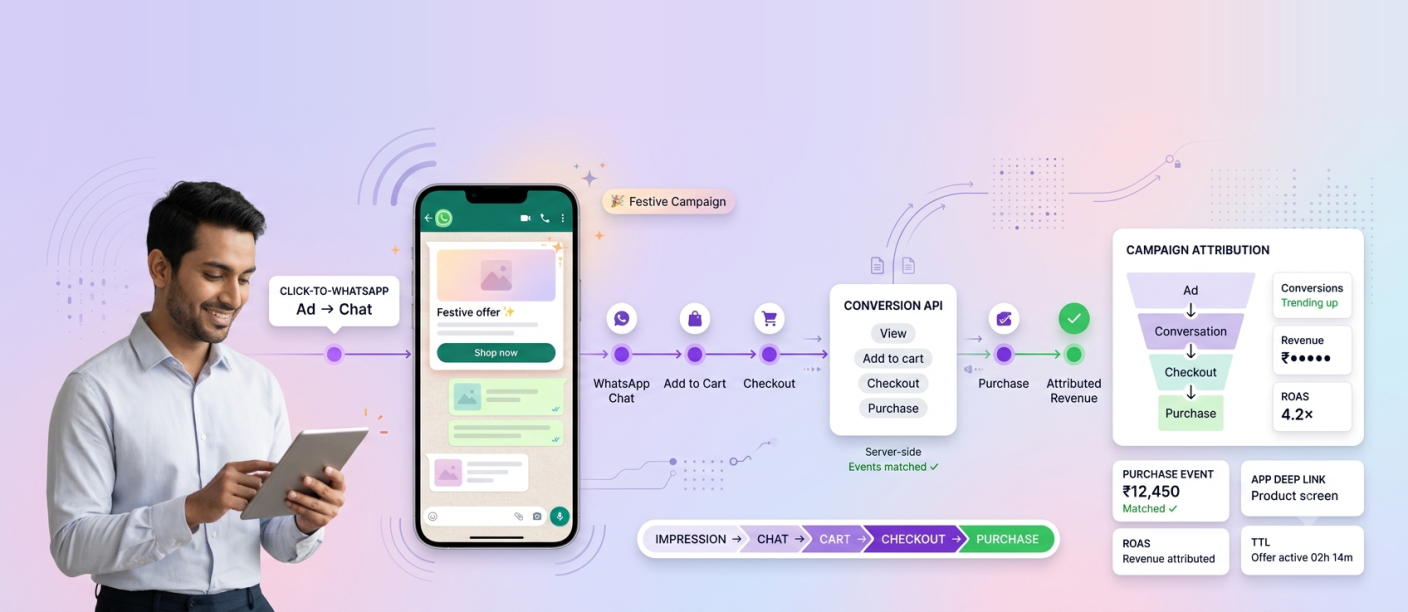
WhatsApp Conversion API improves festive campaign attribution by sending downstream business events, such as add-to-cart, checkout and purchase, back to Meta and linking them to the WhatsApp conversations and ads that started them. Instead of reporting only delivery, read and reply rates, growth teams can see which festive messages and Click-to-WhatsApp ads actually produced revenue, and Meta can use those signals to optimise delivery toward shoppers more likely to convert.
Smartping offers Conversion API reporting alongside the MM Lite API as part of its WhatsApp Business Messaging solution. This guide explains where WhatsApp attribution typically breaks, how conversion signals close the gap, and how CMOs and analytics teams can set it up before peak festive weeks.
Why WhatsApp Attribution Breaks During Festive Campaigns
Festive commerce journeys are rarely linear. A shopper might click a Click-to-WhatsApp ad on Instagram, ask a question in chat, receive a carousel, leave, return through a reminder two days later and finally buy on the app. Standard reporting struggles with this in several ways:
Engagement metrics stop at the chat. Delivery, read and reply rates show interest, not revenue. A campaign with high replies may convert poorly, and vice versa.
Conversions happen off-platform. Purchases often complete on a website or app, where the original WhatsApp touchpoint is invisible to the analytics stack.
Ad platforms optimise on weak signals. Without purchase data, ad delivery optimises for conversations started, which can attract low-intent clicks during high-traffic festive periods.
Multiple campaigns overlap. Category, brand and regional teams run concurrent festive campaigns, making it hard to credit the message that actually drove the sale.
Budget decisions lag. If attribution is reconciled manually after the sale, teams cannot shift spend toward winning campaigns while the festive window is still open.
The result is that WhatsApp is often undervalued or overvalued in the marketing mix, because its contribution is estimated rather than measured.
What WhatsApp Conversion API Does
Meta’s Conversions API for business messaging allows a business to send server-side events that describe what a customer did after engaging on WhatsApp. Each event carries context that connects it to the conversation or ad that preceded it.
In practice, it works like this:
1. A shopper enters WhatsApp from a Click-to-WhatsApp ad or a marketing message. For ad-driven chats, Meta attaches a click identifier to the conversation.
2. The business records the journey in its own systems as the shopper browses, adds to cart and checks out.
3. Conversion events are sent back to Meta through the API, such as a lead submitted, checkout initiated or purchase completed, along with event value where relevant.
4. Meta matches the events to the originating ad or message, making them visible in reporting and usable for delivery optimisation.
Because these events are sent server-side, they do not depend on browser cookies or pixels firing on a page, which makes them more reliable for journeys that move between chat, web and app.
How Smartping Connects WhatsApp Interactions to Conversion Signals
Smartping brings this capability together with its WhatsApp campaign tooling so attribution is part of how campaigns are planned, not a reporting afterthought.
Conversion API reporting. Advanced reporting enabled by Conversion API gives visibility into web and app conversions that follow WhatsApp interactions, closing the gap between chat engagement and revenue.
MM Lite API for marketing messages. Smartping’s MM Lite API is a direct marketing API designed to optimise message delivery and reads. It comes with performance benchmarks and actionable recommendations, so teams can see how campaigns compare and what to improve.
Time-to-Live (TTL) controls. Customisable TTL settings let teams define how long a marketing message remains deliverable. For time-bound festive offers, this prevents a flash-sale message from landing after the sale has ended and distorting campaign results.
App deep links. Messages can route shoppers directly into specific app screens, preserving the journey so in-app purchases can be tied back to the originating message.
Click-to-WhatsApp ad insights. Ad performance metrics such as impressions, CTR, CPC and CPM can be analysed alongside downstream conversion events, giving a full-funnel view from ad impression to purchase.
Campaign analytics. Reach, engagement, conversions, CSAT and ROAS can be tracked across WhatsApp campaigns, supporting customer journey analytics across the festive season.
Which Conversion Events Should Festive Campaigns Track?
The value of Conversion API depends on sending the right events. For festive ecommerce, a practical event map looks like this:
| Funnel Stage | Event to Send | What It Tells You |
|---|---|---|
| Interest | View content | Which products from a carousel or catalog shoppers explored |
| Intent | Add to cart | Which festive offers create purchase intent |
| Lead capture | Lead submitted | Which flows capture details for high-value categories |
| Checkout | Initiate checkout | Where shoppers enter payment and where they stall |
| Revenue | Purchase (with value) | Which campaigns and ads drove actual revenue |
Sending purchase value is especially important. It allows teams to calculate true WhatsApp ROAS rather than relying on conversation counts, and it gives Meta stronger signals to optimise ad delivery toward higher-value shoppers.
Where checkout happens inside the chat through native payments, the purchase event can be tied even more closely to the conversation that produced it.
Setting Up Conversion Tracking Before the Festive Season
Attribution is far more useful when it is live before traffic peaks. A practical setup sequence:
1. Define the event taxonomy. Agree on which events matter, what counts as a conversion and how value is calculated, including discounts and festive bundles.
2. Map identifiers across systems. Ensure the WhatsApp conversation, ad click identifier and customer record can be linked in your CRM, commerce platform or CDP.
3. Configure server-side event sending. Work with your engineering team and Smartping’s specialists to send events from your backend as orders progress.
4. Validate with test campaigns. Run small pre-festive campaigns to confirm events are firing, matching correctly and appearing in reporting.
5. Set TTL and deep links per campaign. Align message validity with offer windows and route shoppers to the right app or product screens.
6. Build a reporting cadence. Review conversion data daily during peak weeks so budget and creative decisions happen while the festive window is still open.
For broader planning, explore Smartping’s festive campaign solutions and its approach to retail customer engagement.
How Better Attribution Improves Festive Campaign Optimisation
Once conversion signals flow reliably, growth teams can act on them in real time:
1. Shift budget mid-campaign toward Click-to-WhatsApp ads and messages with the highest revenue per conversation.
2. Refine audiences by excluding segments that engage but rarely buy.
3. Improve creatives based on which carousels, offers and CTAs lead to purchases, not just replies.
4. Fix funnel leaks by identifying where initiated checkouts fail to become purchases.
5. Report WhatsApp’s contribution accurately to leadership, using measured revenue instead of estimates.
The WhatsApp Business API becomes a measurable growth channel rather than an engagement tool with assumed impact. Smartping’s work with brands such as a leading digital lender and India’s leading real estate company shows how structured WhatsApp campaigns support lead generation and acquisition at scale.
Frequently Asked Questions
How does WhatsApp Conversion API improve festive campaign attribution?
It sends events such as add-to-cart, checkout and purchase back to Meta and links them to the WhatsApp conversations and ads that preceded them, so teams can measure which festive campaigns drove revenue.
What is the difference between WhatsApp analytics and conversion tracking?
WhatsApp analytics typically covers delivery, reads and replies. Conversion tracking connects those interactions to business outcomes such as purchases and leads, including those completed on a website or app.
Can WhatsApp Conversion API track purchases made on a website or app?
Yes. Events are sent server-side from your systems, so conversions completed on web or app can be attributed back to the originating WhatsApp interaction.
How does Conversion API help calculate WhatsApp ROAS?
By sending purchase events with their value, teams can compare revenue against campaign and ad spend for each WhatsApp campaign.
Does Smartping support WhatsApp Conversion API?
Yes. Smartping offers advanced reporting enabled by Conversion API alongside its MM Lite API, TTL controls, app deep links and campaign analytics.
Measure What Festive WhatsApp Campaigns Really Deliver
Festive budgets are too large to optimise on engagement alone. With Conversion API reporting, MM Lite API benchmarks and full-funnel analytics, Smartping helps growth teams connect every WhatsApp conversation to a measurable conversion signal and act on it while the season is still live.
Talk to Smartping’s experts to set up WhatsApp conversion tracking before your next festive campaign.