India
India
 Singapore
WhatsApp Business API: A Complete Guide for Enterprises
-
 By Smartping
- Aug 24, 2026
- WABA

Customer interactions rarely stay on one channel. A customer discovers a product through an ad, evaluates it on a website, completes the purchase somewhere else, and returns through yet another channel when they need support. Every handoff between channels is a place where context gets lost, and where the customer experience starts to feel disjointed.
WhatsApp Business API brings these stages into a single channel: awareness, consideration, purchase, fulfillment, and post-purchase engagement all happen in one continuous conversation. Customers ask, act, and follow up without repeating themselves. For businesses, that continuity shows up directly in conversion rates, support costs, and customer lifetime value.
This guide covers what WhatsApp Business API is, how it works, and where it delivers measurable value for enterprises operating at scale.
What Is WhatsApp Business API ?
WhatsApp Business API, also called the WhatsApp Business Platform is an enterprise-grade messaging infrastructure built for businesses that communicate with customers at scale. It is a different product from the WhatsApp Business App, which is designed for small businesses managing conversations manually. The API is built for volume, automation, and integration with the systems a business already runs on.
It is a paid solution, and access does not run directly through WhatsApp. Businesses reach it through Business Solution Providers (BSPs), companies officially integrated with Meta’s infrastructure and authorized to provide and manage API access.
| Capability | Standard WhatsApp | WhatsApp Business App | WhatsApp Business API |
| Built for | Personal use | Small businesses | Mid to large enterprises |
| Messaging volume | Low | Low to medium | High |
| Automation | None | Limited | Full |
| System integration | None | None | CRM, ERP, and more |
| Access | Direct | Direct | Via authorized BSP |
Core Capabilities Built for Enterprise Communication
1. Verified Business Profile. The official green tick badge establishes credibility and confirms the account belongs to a real, verified business.
2. Rich media support. Images, GIFs, videos, carousels, documents, and embedded webviews can all be shared within a single chat.
3. In-app payments. UPI and card/net banking are supported natively, so transactions complete inside WhatsApp without redirecting the customer elsewhere.
4. Click-to-WhatsApp ads. Ads drive prospects directly into a WhatsApp conversation, giving businesses a way to capture and qualify leads at the moment of interest.
5. Catalog and add-to-cart. Customers browse products, add items to a cart, and move toward purchase without leaving the conversation.
6. CTA and reply buttons. Predefined response options guide the customer toward faster, more decisive actions.
7. Campaign analytics. Reach, engagement, conversions, CSAT, and ROAS are tracked at the campaign level.
8. MM Lite and Conversion API. Campaign optimization, performance tracking, and TTL controls support tighter conversion management.
How the API Moves a Message
A message sent through WhatsApp Business API follows a consistent path:
Enterprise systems → BSP → WhatsApp → Customer → Back to the system
A customer action triggers a message from the CRM or business system. It passes through an authorized BSP, which handles compliance and delivery. WhatsApp delivers the message, encrypted, within seconds. When the customer replies, that response routes back into the originating system, keeping the conversation connected end to end.
The Three Message Template Types
Every business-initiated message on WhatsApp uses one of three template types, each built for a different purpose:
1. Marketing templates initiate business-led conversations with opted-in users for product launches, promotional campaigns, abandoned cart recovery, discount codes, and catalogue showcases. Subtypes include countdown timers and personalized coupon formats.
2. Utility templates carry transactional information: order confirmations, shipping updates, appointment reminders, and post-interaction feedback requests. These reach customers at the moments that matter most operationally.
3. Authentication templates support secure verification flows such as account registration, login OTPs, and two-step authentication, typically with one-tap autofill or copy-code buttons to reduce friction.
Together, these categories give enterprises a structured, Meta-compliant framework for communicating across the full customer lifecycle.
Mapping WhatsApp to the Customer Lifecycle
WhatsApp Business API supports a continuous cycle rather than a single transaction:
Awareness → Discovery → Consideration → Purchase → Post-Purchase → Re-Engagement
1. Awareness: Customers discover the brand through campaigns and are directed into a WhatsApp conversation.
2. Discovery: Businesses help customers explore products, services, and offers through conversational messaging.
3. Consideration: Interactive messages and guided conversations help customers evaluate their options.
4. Purchase: WhatsApp supports the transaction itself, along with product information and purchase assistance.
5. Post-Purchase: Order confirmations, delivery updates, and other notifications to keep customers informed.
6. Re-Engagement: Businesses reconnect through relevant updates, feedback requests, loyalty programs, and permitted follow-up messages.
Re-engaged customers move back into discovery as they explore new offerings, which is what makes WhatsApp a channel for the full customer relationship rather than one stage of it.
Industry Applications
Every industry has a different relationship with its customers, and no single message type fits all of them. Here is how it works across the following six sectors, with the exact use cases that drive results in each.
1. Government
Traditional channels like notice boards, newspaper ads, and IVR calls yield low engagement and create administrative bottlenecks. The WhatsApp Business Platform allows public institutions to move outreach, enrollment, and crisis response onto a verified channel citizens check daily closing the gap between government departments and the people they serve.
Government Use Cases
• Outreach and Awareness: Departments push scheme information, policy updates, and public health advisories directly to registered citizens, replacing static notices with messages people are likely to actually read.
• Enrollment and Onboarding: Citizens complete scheme registrations, document submissions, and eligibility checks conversationally, cutting down the need for in-person visits to government offices.
• Emergency Alerts: Dispatch time-sensitive, location-specific warnings and crisis helplines during emergency events. (e.g., “Alert: Heavy rainfall expected in your district over the next 24 hours. Avoid low-lying areas. Helpline: 1077.”)
• Service Tracking and Updates: Applicants track the status of pending applications, grievances, or service requests without having to call a helpline or visit a portal.
2. Retail and E-commerce
End-to-end communication plays a decisive role in customer retention and repeat business. WhatsApp Business Solution keeps buyers informed at every stage of the order journey, from confirmation to delivery, on a channel they actively use. This level of consistency builds the trust that turns first-time buyers into loyal, long-term customers.
Retail and E-commerce Use Cases
• Order Confirmation: The moment a purchase is completed, customers receive an instant message. For example:
“Hi Preeti, your order of the Wiselife eye mask has been placed successfully! Order ID: #SN45231. Amount Paid: ₹1,099. Expected Delivery: 28th April.”
• Shipping and Delivery Updates: Real-time dispatch and delivery alerts keep customers informed at every stage, from “shipped” to “out for delivery” to “delivered.”
• Review and Feedback Collection: A simple post-delivery prompt captures customer sentiment while the experience is still fresh, feeding directly into product and service improvements.
• Back-in-Stock Alerts: Customers who showed interest in a sold-out product are notified the moment it’s available again, converting missed sales into repeat purchase opportunities.
3. Healthcare and Wellness
Patient communication carries a different weight missed appointments, delayed reports, and forgotten medication doses have real consequences. WhatsApp Business Solution gives healthcare providers a direct, private channel to keep patients informed and engaged across the entire care journey.
Healthcare and Wellness Use Cases
• Appointment Scheduling: Patients book, reschedule, or confirm appointments conversationally, reducing front-desk load and no-shows.
• Lab Report Delivery: Reports are shared securely the moment they’re ready. For example: “Hi Arjun, your blood test report from 10th August is ready. Tap below to view your results.”
• Post-Care Follow-Ups: Patients receive check-in messages after a procedure or consultation, prompting them to report symptoms or flag concerns early.
• Appointment and Medication Reminders: Automated reminders for upcoming visits and daily medication schedules help patients stay consistent with care plans.
4. BFSI
Financial communication demands speed, accuracy, and trust in equal measure. WhatsApp Business Solution lets banks, NBFCs, and insurers deliver time-sensitive updates and self-service tools directly to customers, reducing dependency on branch visits and call centers.
BFSI Use Cases
• KYC Updates and Notifications: Customers receive prompts to complete pending KYC steps and confirmation once verification is complete.
• Real-Time Transaction Alerts: Every debit, credit, or fund transfer triggers an instant notification, keeping customers informed without needing to open a banking app.
• Loan Pre-Eligibility Checks: Prospective borrowers check their eligibility and estimated loan terms conversationally, before initiating a formal application.
• EMI and Due Reminders: Customers are reminded of upcoming EMI dates, credit card dues, or premium payments well ahead of the deadline.
• Suspicious Activity Alerts: Unusual account activity triggers an immediate alert. For example: “We noticed a login attempt on your account from a new device. If this wasn’t you, tap here to secure your account immediately.”
5. Travel and Hospitality
Travel decisions are time-sensitive and emotionally driven, from booking a trip to tracking a flight delay. WhatsApp Business Solution helps travel and hospitality brands stay present at every one of these moments, building the kind of responsiveness travelers expect from a trusted brand.
Travel and Hospitality Use Cases
• Booking Confirmation: Travelers receive instant confirmation the moment a booking is completed. For example:
“Hi Rohan, your booking at The Ridgewood Resort is confirmed. Check-in: 14th Sept. Booking ID: #TR8821. View your itinerary here.”
• Limited-Time Vacation Offers: Curated, time-bound deals are sent to travelers based on past bookings or browsing behavior, prompting quicker decisions.
• Exclusive Upsell Offers: Guests are offered room upgrades, add-on experiences, or extended stays at the right moment in their journey, ahead of or during their trip.
• Real-Time Status Updates: Flight delays, gate changes, and check-in reminders reach travelers instantly, reducing dependence on airport announcements and airline apps.
6. EdTech
A student’s journey from interest to enrollment to course completion involves multiple drop-off points. WhatsApp Business Solution helps edtech platforms stay engaged with students and parents at each of these stages, keeping them informed and on track through a channel they check consistently.
EdTech Use Cases
• Course Enrollment Confirmation: Students receive instant confirmation once enrollment is complete, along with next steps to begin the course.
• Recover Application Drop-Offs: Prospective students who abandon an application midway are re-engaged with a reminder to complete their pending steps.
• Class and Assignment Reminders: Automated reminders for upcoming live classes and assignment deadlines. For example: “Reminder: Your assignment for ‘Data Structures – Module 3’ is due tomorrow at 11:59 PM. Submit here.”
• Progress Reports and Performance Updates: Students and parents receive periodic performance summaries, keeping them informed of progress without needing to log into a separate portal.
What Business Benefits Does WhatsApp Business API Deliver?
Here is what businesses gain when they move to WhatsApp Business API:
1. High Engagement and Conversion: WhatsApp messages are read within minutes, with open rates exceeding 98%. Businesses that communicate through a channel customers actively use see higher engagement, faster responses, and better conversion rates across every stage of the customer journey.
2. Secure Sharing of Sensitive Information: WhatsApp’s end-to-end encryption ensures sensitive information is protected in transit. Allowing businesses in highly regulated industries the confidence to communicate critical data securely and compliantly.
3. Seamless Integration with Existing Business Systems: WhatsApp Business API connects directly with CRMs, ERPs, e-commerce platforms, and contact centers, ensuring communication stays aligned with existing systems and workflows. This allows businesses to scale messaging as needed without changing how they operate.
4. Rich Media Support: Beyond text, the API supports images, documents, videos, and interactive buttons within a single conversation. Businesses can share invoices, product catalogs, boarding passes, and more, making messages more interactive for customers.
How Does WhatsApp Business API Deliver Measurable ROI?
The impact of WhatsApp Business API on ROI is visible across the entire customer lifecycle. Here is where enterprises consistently see the clearest impact.
1. Higher Campaign Conversions
WhatsApp Business API improves campaign conversions by enabling customers to act immediately at the moment of engagement. Interactive elements such as buttons, product links, and catalogues allow customers to explore, enquire, and complete actions within the same channel. This keeps the journey uninterrupted and results in higher campaign conversions.
2. Customer Retention and Lifetime Value
Keeping customers engaged after the first purchase is where long-term value is built. Timely nudges, loyalty updates, and relevant recommendations bring customers back and encourage them to invest more. On a channel they are already active on, these messages are seen and acted upon, providing a better customer experience and increasing lifetime value.
3. Lower Costs with Proactive Customer Updates
When customers receive proactive messages like “Your order has been confirmed,” “Your payment was received,” or “Your delivery is on its way,” it reduces anxiety and makes it convenient for them to stay updated. This builds trust in the brand, and when customers already have the information they need, the need to reach out to support reduces significantly. This results in lower operational costs and allows teams to redirect resources toward high-value tasks.
4. 24/7 Customer Support and Experience
Enterprises can leverage the WhatsApp Business API solution to provide round-the-clock customer support and resolve queries more efficiently. Conversational AI can handle routine queries and deliver instant support, while WhatsApp calling enables brands to assist customers with more complex concerns through direct voice interactions. Together, this creates a more responsive and unified customer experience.
5. Operational Efficiency Through Automation
As businesses scale, the volume of customer communication grows with it. WhatsApp Business API manages this through system-triggered messaging, automatically sending the right message the moment a customer action or business event requires it. This significantly reduces manual effort and gives teams the bandwidth to focus on work that drives more value.
Best Practices for WhatsApp Business API
Meta actively monitors how bulk messages are received. Blocks, reports, and opt-outs affect an account’s messaging quality rating, which determines daily sending limits and long-term platform access. The practices below determine whether bulk messaging scales without interruption.
1. Collect explicit opt-in before messaging. Every customer must give explicit consent before a business can message them on WhatsApp, and that consent must clearly state the business name and confirm that communication will happen over WhatsApp. Messaging a contact without opt-in is a policy violation that puts the account at risk.
2. Use approved templates in the correct category. Every business-initiated message must use a Meta-approved template under the right category marketing, utility, or authentication. Misclassifying a template or altering its content affects delivery and can trigger an account review.
3. Never send content that violates Meta’s policies. Misleading, fraudulent, or unsolicited content risks account restriction or permanent suspension.
4. Monitor feedback metrics and act on them quickly. Meta assigns a messaging quality rating based on delivery, read, and response rates alongside customer feedback. A rise in blocks or reports lowers that rating and reduces daily sending limits tracking performance after every campaign is what protects and grows sending capacity.
5. Maintain suppression lists. Customers who opt out must be removed from all future sends immediately. Continuing to message them damages trust and the account’s standing with Meta.
6. Keep Business Manager details accurate. Business name, address, and verification documents need to stay current. Outdated information slows template approvals and can restrict sending.
Conclusion
Customer expectations towards brands have evolved over the past decade. Today, they value personalized interactions, timely responses, and meaningful engagement beyond the point of purchase. They expect to feel recognized, valued, and supported throughout the customer journey.
For enterprises, this creates a clear opportunity to influence how customers move from initial interaction to long-term engagement. WhatsApp Business API enables businesses to stay connected with customers at every stage, with communication that is timely, relevant, and context driven. This leads to higher engagement and more effective customer actions, driving conversions, and measurable ROI.
Frequently Asked Questions
1. Can WhatsApp Business API integrate with our existing CRM, ERP, or business systems?
Yes. The API is built to connect with the systems enterprises already run CRMs, ERPs, contact center platforms, and e-commerce tools through APIs and webhooks. Messages triggered by business events flow out automatically, and customer replies route back into the same system, so the API extends existing workflows rather than requiring a new one.
2. How long does it take to get WhatsApp Business API up and running?
Timelines depend on how quickly the business documentation, website verification, and Facebook Business Manager approval come together, along with the BSP’s own onboarding process. A straightforward setup with documents in order typically moves in days to a couple of weeks; template approvals and use-case-specific configuration can extend that slightly.
3. What security measures protect customer data on WhatsApp Business API?
Messages are protected by end-to-end encryption in transit, and access to the API itself is controlled through authentication and authorization managed by the BSP. Enterprises retain responsibility for how customer data is stored and used within their own systems once a message reaches them.
4. Is WhatsApp Business API compliant with data protection and industry regulations?
The platform is built to support compliant messaging, but the compliance posture of any given deployment depends on the business’s own data handling practices, template content, and the regulatory requirements of its industry and geography. Regulated sectors BFSI, healthcare, government should confirm specific compliance requirements with their BSP before going live.
5. Can WhatsApp Business API handle high-volume enterprise messaging?
Yes this is what distinguishes the API from the WhatsApp Business App. Sending limits scale with the account’s messaging quality rating, which is based on delivery, read, and response rates. A well-managed account with strong opt-in practices and low block/report rates can scale its daily sending volume significantly over time.
6. How can businesses track WhatsApp message delivery, engagement, and conversions?
Campaign analytics track reach, delivery, read rates, engagement, CSAT, and ROAS at the message and campaign level. These metrics typically surface through the BSP’s dashboard and can also be piped into a business’s own analytics or CRM systems for a unified view.
7. What happens if a WhatsApp message is not delivered?
Delivery can fail for reasons including an invalid number, a customer who hasn’t opted in, a message sent outside the allowed template window, or the recipient having blocked the business. Most BSP dashboards flag failed deliveries with a reason code, which lets businesses correct the underlying issue a bad number, an expired session before resending.
8. How do I choose the right WhatsApp Business Solution Provider (BSP)?
He decision usually comes down to a few factors: how well the BSP’s platform integrates with existing business systems, the level of support offered during template approval and account setup, transparency around pricing and conversation-based billing, and the BSP’s track record with businesses of a similar size and industry. Enterprises with complex use cases should also weigh the BSP’s automation and AI capabilities, since these directly affect how much manual effort messaging requires at scale.

Enable businesses to forge enduring connections with their customers through multiple channels.
Latest Blogs
-
Smartping at World AI Summit 2026: AI Voicebot and WhatsApp AI Chatbots for Enterprises
Bengaluru, 21 October 2026: Smartping, a Meta Business Partner and enterprise communication platform, showcased its AI Voicebot and WhatsApp AI...
Read More
-
WhatsApp Ads Guide: How to Run Click-to-WhatsApp Campaigns in Ads Manager and Convert Chats into Leads
WhatsApp ads are Click-to-WhatsApp ads: Facebook and Instagram ads with a “Send WhatsApp Message” button that opens a chat with...
Read More
-
How to Send Messages with the WhatsApp API: Templates, the 24-Hour Window and Interactive Messages
To send a message with the WhatsApp API, your system sends a request to Meta’s Cloud API specifying the recipient,...
Read More
-
WhatsApp Business Marketing at Enterprise Scale: From Broadcasts to Customer Engagement
WhatsApp Business marketing at enterprise scale means using the official WhatsApp Business Platform to run personalised, permission-based campaigns and two-way...
Read More

Share


Related Blogs & Articles
Smartping at World AI Summit 2026: AI Voicebot and WhatsApp AI Chatbots for Enterprises
Bengaluru, 21 October 2026: Smartping, a Meta Business Partner and enterprise communication platform, showcased its AI Voicebot and WhatsApp AI...
WhatsApp Ads Guide: How to Run Click-to-WhatsApp Campaigns in Ads Manager and Convert Chats into Leads
WhatsApp ads are Click-to-WhatsApp ads: Facebook and Instagram ads with a “Send WhatsApp Message” button that opens a chat with...
How to Send Messages with the WhatsApp API: Templates, the 24-Hour Window and Interactive Messages
To send a message with the WhatsApp API, your system sends a request to Meta’s Cloud API specifying the recipient,...
WhatsApp Business Marketing at Enterprise Scale: From Broadcasts to Customer Engagement
WhatsApp Business marketing at enterprise scale means using the official WhatsApp Business Platform to run personalised, permission-based campaigns and two-way...
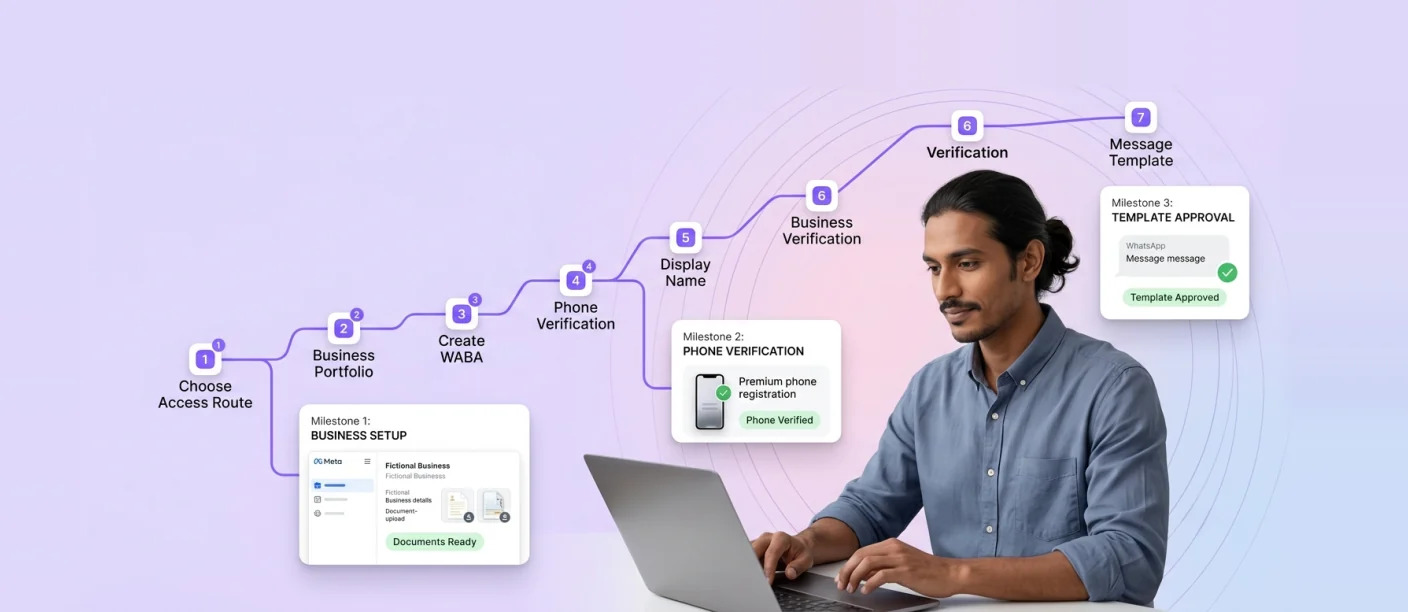
WhatsApp Business API Application: Step-by-Step Approval, Verification and Eligibility Guide (India)
A WhatsApp Business API application involves setting up a Meta Business Portfolio, creating a WhatsApp Business Account, registering a dedicated...
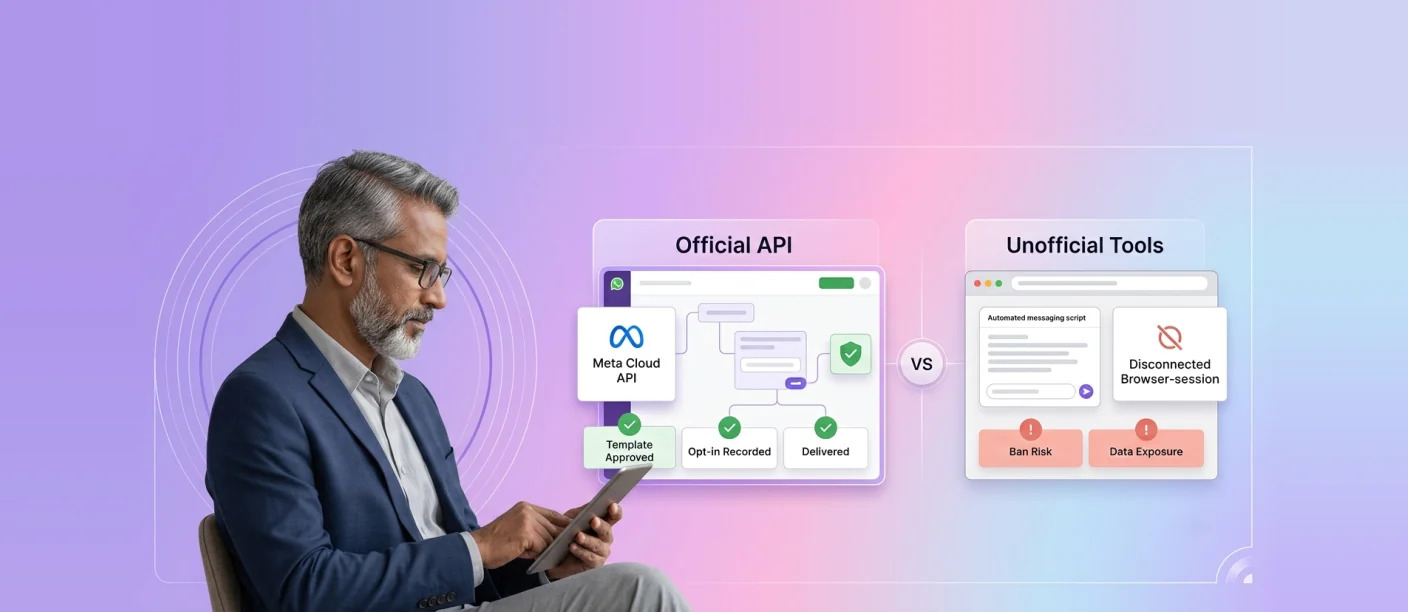
Official Meta WhatsApp API vs Unofficial WhatsApp Tools: Ban Risks, Compliance and How to Choose
The Meta WhatsApp API, officially part of the WhatsApp Business Platform, is the only sanctioned way for businesses to send...




 First Floor, Unit F-49, Sector-47, Spaze Boulevard, Gurugram, Haryana 122018