

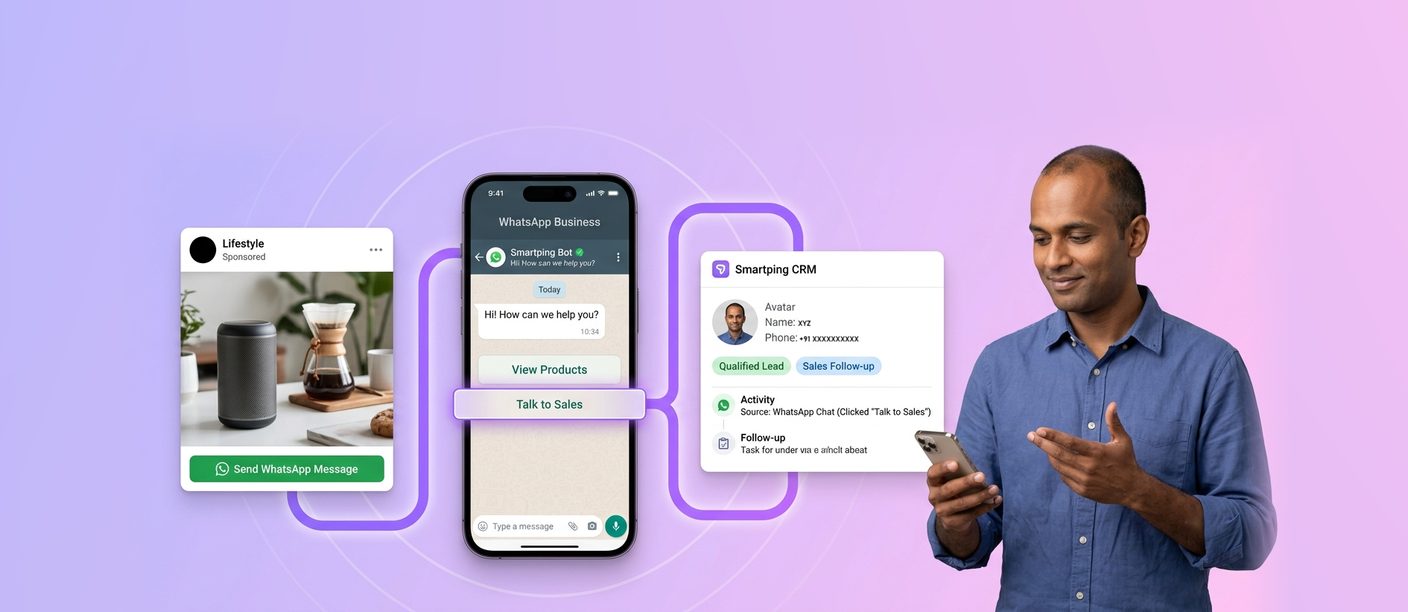
WhatsApp ads are Click-to-WhatsApp ads: Facebook and Instagram ads with a “Send WhatsApp Message” button that opens a chat with your business instead of a landing page. You create them in Meta Ads Manager, and every click becomes a conversation you can qualify, nurture and convert into a lead or sale.
This guide is for performance marketers, D2C growth teams and agencies running Meta ads in India. Smartping is a Meta Business Partner that helps brands run Click-to-WhatsApp ads with Smartping, connecting ad-driven chats to automation, agents and reporting. For platform basics, see our WhatsApp Business API complete guide.
What Are WhatsApp Ads?
Click-to-WhatsApp ads are Meta ads on Facebook and Instagram that open a WhatsApp conversation with your business when tapped. Instead of sending users to a website, they start a chat where you can answer questions, qualify leads and close sales.
Ads do not appear inside WhatsApp chats or status updates as standard placements. WhatsApp is the destination, not the placement: the ad runs on Facebook or Instagram, and the conversation happens on WhatsApp.
Why Click-to-WhatsApp Ads Outperform Landing Pages and Lead Forms
Click-to-WhatsApp ads sit inside one of Meta’s fastest-growing businesses. In January 2026, Meta reported that click-to-message ad revenue growth had accelerated in the last quarter of 2025, and that paid messaging within WhatsApp had crossed a $2 billion annual run-rate. Growth continued through 2026: in Q2 2026, Meta’s other revenue, driven primarily by WhatsApp paid messaging and subscriptions, reached $1 billion for the first time, up 73% year over year. Meta also reported that more than 1 million businesses now use its business agents on WhatsApp and Messenger every week to talk to customers or complete sales.
The advantage comes from what happens after the click:
| Factor | Landing Page | Meta Lead Gen Form | Click-to-WhatsApp Ad |
|---|---|---|---|
| What the user does | Loads a page and fills in a form | Submits a pre-filled form inside Facebook or Instagram | Starts a chat in an app they already use |
| Drop-off risk | High on slow mobile pages | Low to submit, but many leads go cold before the first sales call | Low, because the chat opens instantly |
| Lead quality | Depends on form design | Often lower, because pre-filled forms are easy to submit without real intent | Higher when a bot or WhatsApp Flow qualifies the lead in chat |
| Speed to first response | Depends on sales follow-up | Depends on sales follow-up | Immediate, through automated replies |
| Two-way conversation | No | No | Yes, questions are answered before the lead reaches sales |
| Re-engagement | Retargeting ads or email | Calls, SMS or email | The same chat thread, within WhatsApp’s messaging rules |
| Website needed | Yes | No | No |
Lead Gen Forms still suit simple, high-volume list building. Click-to-WhatsApp ads perform best when buyers have questions before they commit, such as property, education, financial products and other considered purchases.
Real-World Results From Click-to-WhatsApp Campaigns
Indian businesses featured on WhatsApp’s official success stories site show where the gains come from:
Learnwise (Kerala, higher education, October 2025): The higher education support platform replaced open-ended chats from its Click-to-WhatsApp ads with a short WhatsApp Flows screening form, set up in Ads Manager. Compared with its usual approach, it produced 4X more qualified leads, cut time spent qualifying leads by 60% and lowered cost per qualified lead by 31%.
Quattro Bistro (Lonavala, restaurant, February 2025): The restaurant ran Click-to-WhatsApp ads on Instagram and Facebook, targeting adults in Mumbai, Pune and Navi Mumbai and starting conversations with diners directly in WhatsApp. Its Valentine’s Day 2025 campaign delivered 3X higher sales than Valentine’s Day 2024.
The common thread: results improve most when the chat moves the customer straight to the next step, such as a qualifying question or a booking, rather than opening an empty conversation and waiting for a sales rep.
How to Advertise in WhatsApp: Step-by-Step in Meta Ads Manager
Step 1: Connect WhatsApp to your Facebook Page. In your Page settings, link the WhatsApp number you want ads to open. For API numbers, this is the number registered to your WhatsApp Business Account.
Step 2: Choose your campaign objective. In Ads Manager, select Engagement for conversations, Leads for lead generation, or Sales if purchases happen in chat.
Step 3: Set the conversion location. At the ad set level, choose Messaging apps and select WhatsApp as the destination.
Step 4: Define your audience. Use location, age, interests and custom or lookalike audiences. For India, narrow by city or pin code for location-based businesses such as real estate or clinics.
Step 5: Choose placements. Advantage+ placements let Meta optimise across Facebook and Instagram feeds, Stories and Reels, or you can select placements manually.
Step 6: Build the creative. Use a clear image or short video, a direct headline and a call to action that sets expectations, such as “Chat for a site visit” or “Get your course fee details.”
Step 7: Set up the message template. Configure the greeting and prefilled message users see when the chat opens (covered below), then publish.
WhatsApp Business Ads Manager vs Meta Ads Manager: Which to Use
The WhatsApp Business app lets small businesses create simple Click-to-WhatsApp ads directly from the app, with limited targeting and reporting. It suits quick, low-budget promotions.
Meta Ads Manager offers full control over objectives, audiences, placements, A/B testing, budgets and reporting. For performance marketers and agencies, and for any business connecting ads to the WhatsApp Business API, Ads Manager is the right choice.
Designing the Chat Entry
The ad gets the click; the first 30 seconds of chat decide whether it becomes a lead.
Welcome message: Greet users immediately, confirm what they clicked on, and tell them what happens next. Match the ad’s offer exactly to avoid confusion.
Ice-breakers: Offer three or four tappable questions, such as “Check availability,” “See prices,” “Book a demo” or “Talk to an expert.” These reduce typing and guide users into structured paths.
Prefilled messages: Add a prefilled message tied to each ad, such as “I’m interested in 2BHK flats in Whitefield.” This tells your team or bot exactly which campaign and offer the lead came from.
Prefilled forms with WhatsApp Flows: Collect name, city, budget or preferred time through in-chat forms instead of back-and-forth questions.
Bot qualification: Use a chatbot to ask qualifying questions, answer FAQs and route high-intent leads to agents. Smartping’s conversational AI supports this kind of automated qualification.
Click-to-WhatsApp ads are one entry point among several; you can also capture chats through WhatsApp website integration such as chat buttons and QR codes.
The 72-Hour Free Entry Point Window
When a user messages your business through a Click-to-WhatsApp ad or a Facebook Page call-to-action button, and you reply within 24 hours, a 72-hour free entry point window opens. During that window, messages you send to that user are not charged by Meta, including template messages.
Why this matters for cost per lead:
-
Longer nurture time. You have three days to qualify, answer questions and follow up without additional messaging costs.
-
Richer follow-ups. Templates such as brochures, offers or booking reminders can be sent within the window.
-
More conversions per click. Leads that don’t convert in the first chat can be re-engaged within the window.
How to use it well: respond fast (automation helps), plan a follow-up sequence across the 72 hours, and push key actions such as site visit bookings or demo slots before the window closes. For more on low-cost API approaches, see our guide to free WhatsApp Business API options.
Industry Playbooks
Real estate (site visits): Run city or locality-targeted ads with project visuals. The bot asks budget, configuration and timeline, shares a brochure, and offers site visit slots. Qualified leads are routed to sales within minutes. See how Smartping supported India’s leading real estate company with WhatsApp lead generation.
EdTech (admissions): Target students and parents by age, location and interests. The chat collects course interest, qualification and preferred intake through a Flow, then books a counselling call. Follow-ups within the 72-hour window share course details and deadlines.
D2C (product launches): Use video ads showcasing a new product. The chat shows a catalog, answers questions on sizing or ingredients, and drives checkout. Our guide on WhatsApp in-chat payments shows how to complete purchases inside the conversation.
Optimisation: Metrics to Watch
| Metric | What It Tells You |
|---|---|
| CPC | How efficiently the ad generates clicks |
| Cost per conversation started | Real acquisition efficiency, since not every click opens a chat |
| Conversation start rate | Whether the creative and CTA set the right expectations |
| Lead rate | Share of conversations that become qualified leads |
| Cost per qualified lead | The metric that matters most to sales |
| Time to first response | Speed directly affects conversion and the 72-hour window |
Linking ads to revenue: Engagement metrics alone can mislead. Our guide on WhatsApp Conversion API and campaign attribution explains how to send lead and purchase events back to Meta for better optimisation.
When to hand off to sales: Route a lead to a human agent when they’ve answered key qualifying questions, ask for pricing or a visit, or show buying intent the bot can’t resolve. Clear handoff rules prevent hot leads from waiting in a bot loop. Learn more in our guide to WhatsApp for sales.
Retargeting: Users who chatted but didn’t convert can be re-engaged later with approved marketing templates, provided they have opted in. Use compliant WhatsApp bulk messaging practices to protect your number’s quality.
Want expert eyes on your campaigns? Request a Click-to-WhatsApp campaign audit by contacting Smartping’s experts.
Frequently Asked Questions
1. Do I need WhatsApp Business API for ads?
No. Click-to-WhatsApp ads work with both the WhatsApp Business app and the API. The API is recommended at scale because it supports automation, multiple agents, CRM integration and conversion tracking. Our comparison of the WhatsApp Business App vs Platform explains the difference.
2. How much do WhatsApp ads cost?
Click-to-WhatsApp ads are bought through Meta’s ad auction, so costs depend on your budget, audience, competition and creative quality. You set a daily or lifetime budget in Ads Manager. Conversations started from these ads also qualify for the 72-hour free entry point window.
3. Can I run WhatsApp ads without a website?
Yes. Click-to-WhatsApp ads send users directly to a chat, so a website is not required to run them. A Facebook Page linked to your WhatsApp number is needed.
4. How to advertise in WhatsApp?
Create a campaign in Meta Ads Manager, set WhatsApp as the conversion location, define your audience and creative, and configure the welcome message users see when the chat opens.
5. Can WhatsApp ads appear inside WhatsApp?
Click-to-WhatsApp ads run on Facebook and Instagram and open a WhatsApp chat. WhatsApp is the destination for the conversation, not a standard ad placement.
Turn Ad Clicks Into Conversations That Convert
Click-to-WhatsApp ads replace slow landing pages with instant, personal conversations. With a strong chat entry, smart use of the 72-hour window, fast qualification and clear handoffs to sales, every click has a much better chance of becoming a lead.
Talk to Smartping’s experts to plan your next Click-to-WhatsApp campaign.